

Lighting uniformity describes how illuminance varies across a defined calculation surface. A uniformity ratio may compare average to minimum, maximum to minimum, or minimum to average light levels. Always read the formula with the number: lower is better for Avg/Min and Max/Min, while higher is better for Min/Avg.
This guide explains the formulas, shows a worked calculation, and uses an existing warehouse comparison to explain what the numbers can and cannot tell you. For the drawing symbols and report layout, use our guide to reading a photometric plan. A professional photometric plan checks the selected fixtures, geometry and criteria together; fixture spacing alone does not establish performance.
What Is Lighting Uniformity Ratio?
Use values from the same surface, calculation grid, units and initial or maintained basis. Avg/Min and Max/Min approach 1:1 as the calculated distribution becomes more even; Min/Avg approaches 1. A favorable ratio does not, by itself, establish adequate light levels or comfortable viewing conditions.
How Designers Use Uniformity Ratios
Designers use the ratio specified for the application and compare it with the actual average and minimum values. Uniformity is one part of lighting design. Glare needs its own assessment of the source, viewing position and surroundings; see our glare-control guide.
- Avg/Min shows how the average level compares to the darkest point.
- Max/Min shows how the brightest point compares to the darkest point.
- For Avg/Min and Max/Min, lower values closer to 1:1 mean less variation. For Min/Avg, higher values closer to 1 mean greater uniformity.
The formula determines how to read the result:
| Uniformity ratio | Formula | How to read it |
|---|---|---|
| Average-to-minimum (Avg/Min) | Eavg ÷ Emin | Closer to 1:1 means less variation between the average and minimum. |
| Maximum-to-minimum (Max/Min) | Emax ÷ Emin | Closer to 1:1 means less variation between the highest and lowest calculated points. |
| Minimum-to-average (Min/Avg) | Emin ÷ Eavg | Closer to 1 means greater uniformity; 0.40 is the reciprocal of Avg/Min 2.5:1. |
Avg/Min vs Max/Min: How to Read the Numbers
Worked example — illustrative values: if one calculation surface has an average of 10 fc, a minimum of 4 fc and a maximum of 18 fc, Avg/Min = 10 ÷ 4 = 2.5:1, Max/Min = 18 ÷ 4 = 4.5:1, and Min/Avg = 4 ÷ 10 = 0.40 (40%). These are three descriptions of the same data, not three different designs. If the minimum is zero, the ratios that divide by it are undefined; investigate the unlit point instead of reporting a finite ratio.
- Avg/Min compares the average with the lowest calculated value.
- Max/Min compares the highest and lowest calculated points; it is not a glare rating.
- Target ranges — vary by application and safety requirements.
There is no single uniformity target for every parking lot, warehouse, office or sports facility. Record the applicable criterion and its source for each calculation area. The IES Lighting Library lists application-specific practices; the adopted project requirements determine which edition and criteria apply.
| Area | Specify | Basis | Next step |
|---|---|---|---|
| Parking | Ratio + limit | Study zones + maintenance basis | Parking study |
| Storage | Task criteria | Floor, work plane or rack surface | Warehouse study |
| Offices | Task criteria | Work plane + grid | Separate glare review |
| Sports | Class + metric | Playing area + calculation planes | Sports study |
Practical Tips for Better Uniformity
You can improve uniformity by adjusting pole spacing, aiming angles, optics, and fixture locations. Even small changes can significantly reduce contrast without increasing the number of fixtures.
- Check for even spacing of fixtures or poles.
- Select optics appropriate for the layout and task.
- Balance energy savings with uniformity requirements.
Real Warehouse Example: Improving Uniformity with a New Layout
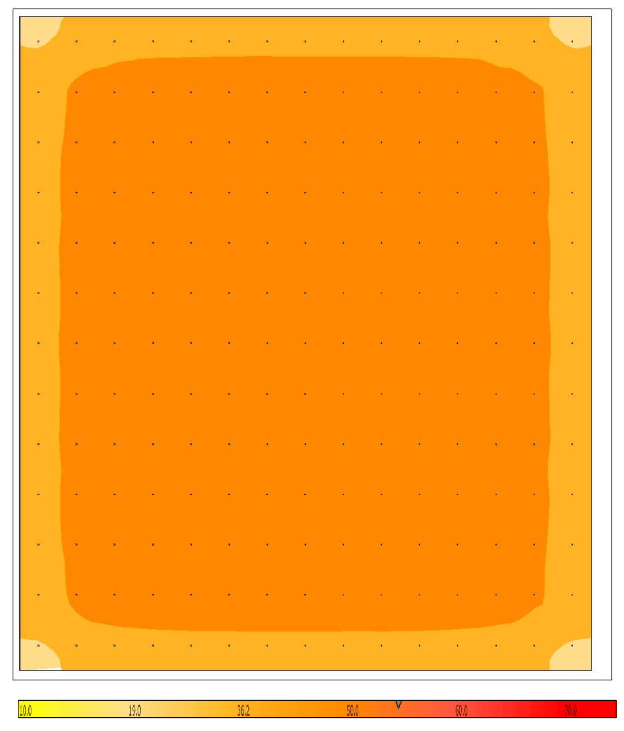
This warehouse comparison illustrates the relationship between calculated illuminance, fixture quantity and uniformity. The two layouts below show different light levels and fixture counts; they are not recommended targets for every warehouse. Compare the numerical summaries rather than relying on false colors alone, because the color scales may differ.
- Original layout: 87 fixtures, Avg 23.3 fc, Max 37.8 fc, Min 11.2 fc → Avg/Min 2.1, Max/Min 3.4.
- Updated layout: 195 fixtures, Avg 52 fc, Max 58.1 fc, Min 29.2 fc → Avg/Min 1.8, Max/Min 2.0.
Below is the before-and-after comparison using the project’s false-color render maps.
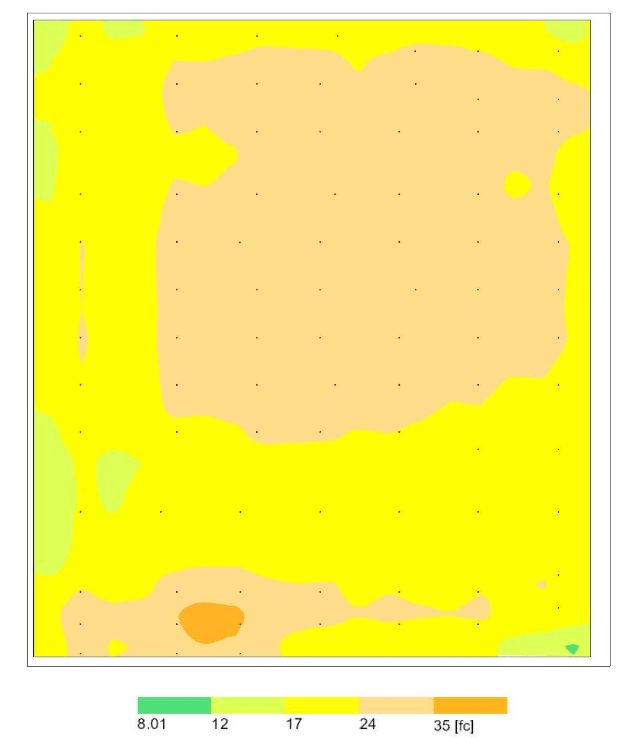
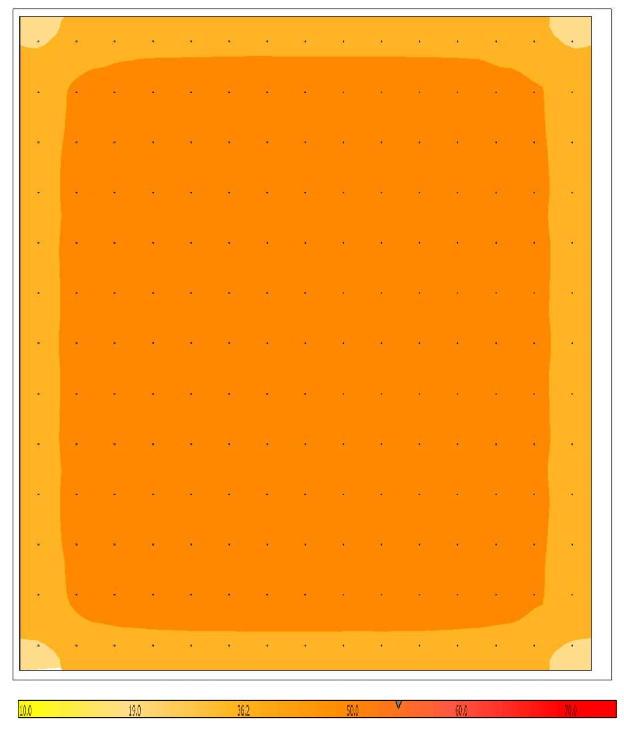
Here is the simplified numerical comparison:
| Metric | Original Layout | Updated Layout |
|---|---|---|
| Average FC | 23.3 fc | 52 fc |
| Maximum FC | 37.8 fc | 58.1 fc |
| Minimum FC | 11.2 fc | 29.2 fc |
| Avg/Min | 2.1 | 1.8 |
| Max/Min | 3.4 | 2.0 |
Get a Professional Photometric Plan
Stetra Lighting prepares project-specific photometric calculations and reports to support design coordination and review. Send your plans and fixture information so we can confirm the required scope and deliverables.
Key Takeaways on Uniformity Ratios
Uniformity ratios reveal how evenly light is spread across a space. They are essential for evaluating safety, comfort, and professional lighting quality in warehouses, offices, parking lots, and exterior sites.
- Uniformity shows how bright and dark areas compare, not just the average light level.
- The required uniformity metric depends on the application and project criterion.
- Max/Min describes the spread of calculated illuminance values; glare requires a separate evaluation.
- Each application has specific target ranges for best performance.
- Small layout adjustments can dramatically improve uniformity.
- A photometric plan documents calculations and assumptions to support design and code review; it does not guarantee approval.
Read uniformity together with the minimum and average light levels, the calculation assumptions and the application criteria. Use a project-specific review to decide whether a layout is suitable.