
Foot-candles and lumens show up in almost every lighting project. Specifications, codes, and photometric plans often call for foot-candles, while fixture data sheets list lumens. If you work in design, engineering, or construction, you need to move between the two quickly and confidently.
This guide explains how to convert foot-candles to lumens using simple formulas, reference tables, and real-world examples. You will also see how to speed things up using the free Stetra Lumen Calculator so you can size lighting for rooms, check vendor proposals, and talk clearly with clients and contractors.
Why Foot-Candles and Lumens Matter in Real Projects
Foot-candles measure how much light falls on a surface. Lumens measure how much light a source emits. Design targets, codes, and IES recommendations are written in foot-candles, but luminaires are selected by lumens. If you cannot connect these two, your layout can be overlit, underlit, or inefficient.
For architects, engineers, and contractors, this conversion is a daily task. You read a requirement like “30 foot-candles on the workplane,” then turn it into fixture counts and spacing that meet the design intent and budget.

Connect design targets to fixture output
When you see a requirement like “30 foot-candles on the workplane,” you must turn that into fixture counts and spacing. That means converting foot-candles to lumens over the actual area. With a clear method and a fast tool like the Stetra Lumen Calculator, you avoid guesswork and long email chains with suppliers.
- Translate code or client targets (in foot-candles) into total lumens needed.
- Compare different fixture options by delivered lumens, not just wattage.
- Catch oversizing early and reduce energy and glare while staying compliant.
How to Convert Foot-Candles to Lumens Step by Step
The core relationship is simple:
Lumens needed ≈ Foot-candles target × Area (square feet)
This is a first-pass approach that many teams use when sizing fixtures. It helps you move from “I need 30 fc in this space” to “I need roughly this many lumens in total.” For detailed design, photometric software and IES files refine the result, but the logic stays the same.
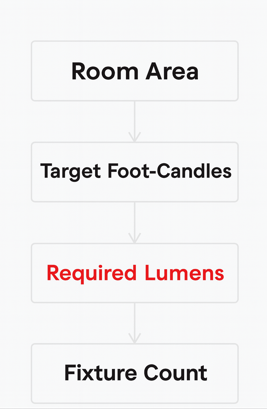
- Step 1: Calculate the room area in square feet (length × width).
- Step 2: Decide on a target foot-candle level based on use (office, warehouse, etc.).
- Step 3: Multiply area by target foot-candles to get approximate lumens required.
- Step 4: Divide by lumens per fixture to estimate fixture count.
- Step 5: Adjust with software, layout, and manufacturer IES files as needed.
If you do not want to calculate by hand, plug the same numbers into the Stetra Lumen Calculator. It follows the same logic but gives you fast results for different room sizes and targets.
Typical Target Foot-Candle Levels by Space
These ranges are common starting points that many teams use before running a detailed photometric plan. Always confirm against your local code and project requirements.
| Space Type | Typical Target (fc) | Notes |
|---|---|---|
| Open office | 30 – 50 | General computer work and paperwork. |
| Private office | 25 – 40 | One or two occupants, task lights optional. |
| Corridor / circulation | 5 – 10 | Focus on safety and wayfinding. |
| Warehouse – general storage | 20 – 30 | Higher for detailed picking or inspection. |
| Retail sales floor | 30 – 50 | Accent lighting adds contrast on merchandise. |
| Classroom / training room | 30 – 50 | Consider separate controls for AV modes. |
Practical rules for foot-candles to lumens
Real spaces are not perfect boxes, and ceilings are not mirrors. Reflectances, optics, and mounting heights all affect delivered light. Still, a few simple rules keep your foot-candles to lumens conversion realistic before you open any software.
- Start with the simple formula: lumens ≈ fc × area. Use it as your baseline.
- Use reasonable targets: select a range from the table above that fits the task.
- Check fixture data: use delivered lumens from the data sheet, not just source lumens.
- Include maintenance: add a margin so the space still meets foot-candle levels over time.
- Verify with IES files: run a quick photometric layout to confirm that your manual conversion holds up.
Quick Foot-Candles to Lumens Reference Table
The table below shows approximate lumens needed for different room sizes and foot-candle targets. Use it as a sanity check when reviewing layouts or fixture schedules, and then confirm the values inside the Lumen Calculator.
| Room Size (ft) | Area (sq ft) | Target (fc) | Approx. Lumens Needed |
|---|---|---|---|
| 10 × 10 | 100 | 20 | 2,000 |
| 10 × 12 | 120 | 30 | 3,600 |
| 15 × 15 | 225 | 30 | 6,750 |
| 20 × 20 | 400 | 30 | 12,000 |
| 20 × 30 | 600 | 30 | 18,000 |
Once you know roughly how many lumens you need, divide by lumens per fixture to estimate fixture count, then refine the layout with photometric software and the manufacturer’s IES files.
Example: Small Office Foot-Candle to Lumen Calculation
Let’s look at a simple office example. We have a private office that needs comfortable, glare-controlled light for computer work and paperwork. The architect wants to see that the design meets a 30 foot-candle target on the workplane.
- Project / context: 10 ft × 12 ft office (120 sq ft), 9 ft ceiling, general ambient lighting with recessed LED downlights.
- Challenge: The client asks, “How many fixtures do we need?” We must convert the 30 fc target into a lumens requirement using only basic information.
- Result: Using the foot-candles to lumens method, we arrive at a clear fixture count that we can later fine-tune with a full photometric plan.
First, calculate total lumens:
| Parameter | Value |
|---|---|
| Room size | 10 ft × 12 ft |
| Area | 120 sq ft |
| Target illuminance | 30 fc |
| Total lumens needed | 30 fc × 120 sq ft = 3,600 lumens |
Next, check a fixture data sheet. Assume each downlight delivers 900 lumens (delivered, not nominal). To find the number of fixtures:
| Item | Value |
|---|---|
| Lumens per fixture | 900 lm |
| Required total lumens | 3,600 lm |
| Estimated fixtures | 3,600 ÷ 900 = 4 fixtures |
You can run this same example in the Lumen Calculator by entering the room size and target foot-candles. The tool gives you a quick lumen estimate and helps you compare fixture options before you move into full photometric software.
In practice, we would then run a quick layout in a tool like DIALux or AGi32 using the manufacturer’s IES file. That confirms that four fixtures at the planned spacing actually deliver around 30 foot-candles on the workplane with acceptable uniformity and glare.
Get a Professional Photometric Plan
We create accurate photometric plans ready for permitting, contractor installation, and real-world performance.
Key Takeaways: Foot-Candles to Lumens
Converting foot-candles to lumens is about linking design targets to real fixtures and layouts. With a simple formula, reference tables, and a structured workflow, you can move quickly from requirements to a design that looks good on paper and performs well in the field.
- Use the basic formula lumens ≈ foot-candles × area as your first sizing tool.
- Pick foot-candle targets that fit the task type, using ranges like the ones in the table above.
- Use the Stetra Lumen Calculator to check your numbers and explore different room sizes and targets in seconds.
- Convert total lumens to fixture counts with delivered lumens from the data sheet, not just nominal values.
- Confirm performance with photometric software and manufacturer IES files before you issue drawings.
- Document your assumptions so owners, contractors, and reviewers understand how you arrived at the design.
When you need more than a quick rule of thumb or a calculator result, Stetra Lighting can prepare full photometric plans based on manufacturer IES files and your project requirements. That way, your foot-candles to lumens conversion becomes a complete, build-ready design.